


Applied Ballistics Quantum
4.6411.00 Reviews
App Specs
- Version
- 3.7.11
- Updated On
- License
- Free
- Downloads
- 100,000+
- Developer
- Applied Ballistics
- Categories
- Sports
- Platform
- Android, iOS
Screenshots
 Analysis by AppCompare
If you're a shooting enthusiast or a long-range shooting aficionado, then you'll definitely want to check out the Applied Ballistics Quantum app. This nifty tool is designed to enhance your shooting experience by providing advanced ballistic calculations and insights. I’ve been diving into this app, and let me take you through my journey with it.
The central appeal is not simply that a phone can produce a ballistic number; it is that the calculation gives a shooter a more organized way to think about a specific rifle, ammunition, distance, and conditions. I find that distinction important. A calculator is only useful when the details going into it reflect the setup in your hands, and this app is most rewarding for someone willing to build that picture carefully rather than chase a shortcut.
For a new user, that means approaching the first session as setup, not as a quick answer at the range. Gather the information you already know about your rifle and ammunition, enter it deliberately, and check each value before relying on a result. I would treat the output as a planning aid that helps me prepare and make sense of a shot, not as a substitute for safe judgment, sound fundamentals, or following the rules of the range.
What the ballistic calculation changes
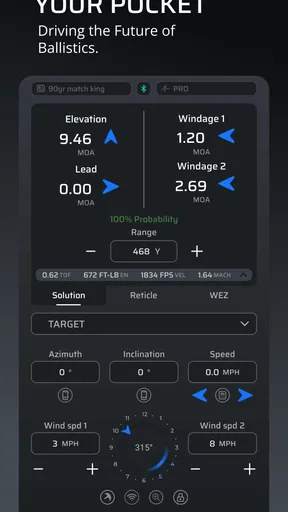
Upon launching the Applied Ballistics Quantum app, the first thing that caught my eye was its sleek and professional interface. It's clear that a lot of thought went into making this app user-friendly while packing in a ton of features. You'll find a comprehensive menu with options for ballistic calculators, bullet libraries, and even a section for weather data, which is crucial for long-range accuracy.
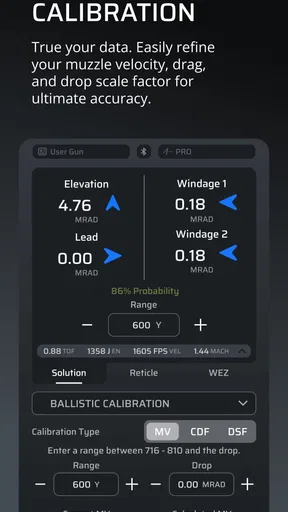
The app really shines in its ability to provide detailed ballistic calculations. With a few taps, I could input various parameters such as bullet weight, muzzle velocity, and target distance. The app then worked its magic, spitting out data that could make even the most seasoned marksman nod in approval.
The practical gain is consistency: instead of relying on a half-remembered adjustment or scribbled notes from a previous outing, I can keep the relevant inputs together and review how they affect the calculation. That makes it easier to spot a mismatch before it becomes a confusing result. If a profile looks surprising, I would check the ammunition and rifle details first, then review the distance and environmental information, rather than assuming the calculator itself has somehow solved the problem.
This is also where the app’s detailed approach asks something of the user. A precise-looking result can feel authoritative, but precision on a screen is not proof that every input is correct or that conditions will stay the same. I would use the calculation to guide preparation and learning, then confirm decisions through responsible practice. That habit matters more than tapping through the menus quickly.
Worth Reading Before You Choose

Flipboard Shows What News Apps Must Do Beyond the Feed

Switching to Android Auto Means Rethinking Your Driving Routine

Google Calendar Makes a Crowded Week Easier to Manage

Ludo King Makes the Most of the Minutes Between Plans

Baby Panda World Brings Quick Play to Modern Phones, but Its Game Library Feels Busy

ESPN’s Live Game View Makes Following Close Games Easier
Getting Into the Details
One of the standout features is the extensive bullet library. This isn’t your typical run-of-the-mill list; it’s incredibly detailed and constantly updated. Whether you're using a common caliber or something more niche, chances are you'll find it here. I found it pretty impressive how the app caters to a wide range of firearms enthusiasts.
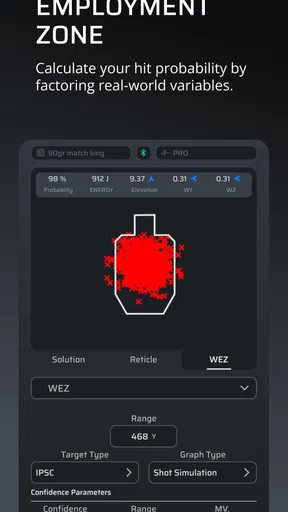
Another aspect that deserves a mention is the weather integration. I mean, how often do you get an app that factors in real-time weather conditions? This feature is a game-changer for long-range shooters. The app pulls in data such as wind speed, temperature, and barometric pressure, all of which can dramatically affect your shot. It’s like having a personal meteorologist in your pocket!
The library is useful not only when choosing a familiar entry but also when checking that the ammunition description you are working from corresponds to the right projectile. I would avoid selecting a merely similar-sounding option just to get through setup. A close match is not automatically an exact one, and the resulting calculation is only as dependable as that choice. If I cannot confidently identify the right entry, I would pause and verify the information from the ammunition or projectile packaging instead of guessing.
Weather deserves the same care. Conditions can change between planning and shooting, and a reading taken earlier should not be treated as a promise about what is happening at the firing point now. I find the weather information most helpful as a reminder to account for the environment and to reassess when the situation changes. It is less useful if I enter it once and then stop paying attention to the conditions around me.
A practical routine is to prepare the rifle and ammunition profile before leaving, then review the weather and distance when setting up at the range. This separates two tasks that are easy to mix together: maintaining reliable equipment details and responding to a changing day. It also makes troubleshooting less chaotic. If a result differs from expectation, I can ask whether the profile, the conditions, or my observation needs another look instead of changing several things at once.
User Experience: Easy or Overwhelming?
Now, I won't lie—there is a bit of a learning curve. The app is packed with features, and while that's a huge plus, it can be a tad overwhelming initially. But trust me, once you get the hang of it, navigating through the app becomes second nature. The developers have done a commendable job with the help section, which provides detailed guidance on using each feature.
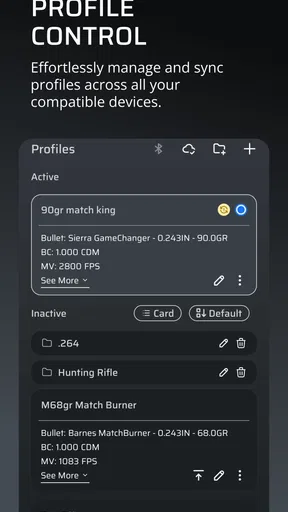
Another thing that stood out to me is the level of customization. You can tweak almost every aspect to suit your specific needs. The ability to save profiles for different firearms and ammunition means you can quickly switch between setups without having to re-enter data. It’s these small touches that make the app incredibly functional.
My advice is to learn one workflow at a time. Start with a single rifle and one ammunition setup, make sure you understand what each field represents, and only then add another profile. This is less exciting than exploring every menu immediately, but it gives you a clean reference point. Once that first setup is dependable, saved profiles become a real convenience: switching between equipment is less error-prone than repeatedly rebuilding a calculation from memory.
Profiles are especially helpful for a shooter who rotates between setups, but they can also create a quiet risk: selecting the wrong saved setup in a hurry. I would make profile names unmistakable and take a moment to confirm the selected rifle and ammunition before using a result. The feature saves repeated entry, not the need to check that the current profile matches what is physically in use.
There is a broader learning benefit here, too. When I change one input and compare how the calculation responds, the app can help me understand which details deserve attention. I would do that kind of exploration in a calm practice setting rather than when people are waiting on the firing line. Learning the interface beforehand keeps the actual range session focused on safe handling and observation, rather than hunting through screens.
For a casual user, the amount of detail may be more burden than benefit. Someone who only wants a simple distance note or a basic range reference may find a lighter tool easier to pick up. The trade-off is that simpler alternatives generally ask less of the user but also do less to organize a carefully tailored ballistic setup. I see Quantum as better suited to people who value that depth enough to spend time learning it.
Performance and Reliability
In terms of performance, the app runs smoothly without any noticeable lag, even when processing complex calculations. It’s robust and reliable, which is exactly what you need when you're out in the field. I didn’t encounter any crashes or bugs during my testing, which speaks volumes about the app’s stability.
The developers also seem committed to maintaining and improving the app. Frequent updates ensure that the app stays relevant and bug-free. It’s always reassuring to know that the app you're using is backed by a team that's dedicated to providing a top-notch experience.
For a real-world example, imagine arriving at a range with two familiar rifle setups and a day that is warmer or windier than expected. I would select the profile for the rifle in hand, check its ammunition details, enter the relevant distance, and then revisit the environmental information before treating the calculation as useful. The value is not that the app makes the session automatic; it is that it gives me a structured place to organize the variables and notice what needs checking.
That workflow also shows when I would not rely on a phone alone. A screen can help with preparation, but it cannot replace safe firearm handling, a proper understanding of the range, or careful observation of changing conditions. If I were unfamiliar with the equipment or uncertain about a value, I would stop and seek competent guidance rather than treating an app output as permission to proceed. For a newcomer, instruction and supervised practice should come before dependence on a calculator.
Quantum is free to install, which makes it possible to explore the basic experience before deciding whether its deeper tools suit your needs. The app is rated for Everyone, and it is a sports utility rather than a game, but that does not make its subject matter casual: responsible use and safe range habits remain essential. Some in-app purchases range from $1.99 to $299.99 per item, so I would check what a particular purchase includes and whether it is relevant to my own workflow before spending anything.
It has been available since May 14, 2012, and its current version is 3.6.0. On Android, the listed minimum operating system is 8.0. Those details are useful when deciding whether an older device is a suitable place to use it, especially if the phone will be taken to a range. I would also plan around ordinary practicalities such as keeping the device usable and checking the screen before a session, rather than assuming an app can help if the phone is unavailable.
As a point of comparison, a basic ballistic calculator may feel quicker if all you need is a one-off estimate. A paper log can be dependable for recording what happened during a session, but it takes more effort to organize and compare changing inputs. Quantum’s advantage is the combination of a bullet library, saved equipment profiles, calculations, and weather-related information in one app. That combination is most meaningful to someone who will use those parts together; if you only want a simple note-taking tool, the extra depth may not justify the learning time.
Applied Ballistics, the developer, has built an app with a clear specialist focus. It has an average rating of 4.4 from around 1.7 thousand ratings, with about 387 written reviews and over 50 thousand installs. Those figures suggest an established audience, but I would not use popularity as a substitute for checking whether the app fits my own rifle, ammunition, and comfort with detailed inputs. The deciding question is practical: will I maintain accurate profiles and use the calculations thoughtfully, or would a simpler method serve me better?
Who Gets the Most From It
After spending some quality time with the Applied Ballistics Quantum app, would I recommend it? Absolutely. Whether you're a seasoned marksman or someone just getting into long-range shooting, this app is a valuable tool. Its comprehensive features, detailed customizations, and reliable performance make it a standout choice in the world of ballistic apps.
Sure, there’s a bit of a learning curve, but the benefits far outweigh any initial confusion. Plus, once you familiarize yourself with it, you'll wonder how you ever managed without it. So, go ahead and give it a shot—pun intended!
I would especially recommend it to a careful long-range shooter who wants to keep multiple equipment setups organized and who is willing to learn what the inputs mean. It also makes sense for someone who likes reviewing a session afterward and wants a more systematic starting point for the next one. The profile workflow and detailed library matter most when they solve a recurring problem, not simply because a large feature set looks impressive.
I would steer away from it if you expect a one-tap answer, do not know the details of your equipment, or would rather avoid managing profiles and environmental inputs. A beginner can still learn from it, but I would not make it the first or only source of instruction. And if your needs are limited to keeping basic range notes, a notebook or simpler app may be less distracting and easier to maintain.
Overall, I see Quantum as a specialized companion for thoughtful preparation, not a replacement for skill or safe decisions. Its strongest use is bringing rifle and ammunition details, ballistic calculations, and weather considerations into a more deliberate workflow. If that is the kind of structure you want, it is worth exploring; if not, choosing a simpler alternative is a sensible decision rather than a compromise.
Pros
- Highly accurate ballistic calculations.
- User-friendly interface for easy navigation.
- Customizable options for advanced users.
- Real-time weather integration enhances precision.
- Comprehensive bullet library included.
Cons
- Requires a stable internet connection.
- Steep learning curve for beginners.
- Limited free features in basic version.
- High battery consumption during use.
- Occasional lag on older devices.
FAQs for Applied Ballistics Quantum
What is the main purpose of the Applied Ballistics Quantum app?
Applied Ballistics Quantum is designed for precision shooters and ballistic enthusiasts. It provides advanced tools for calculating ballistic trajectories, wind effects, and other variables to enhance shooting accuracy. The app uses sophisticated algorithms and a comprehensive bullet library to deliver precise data for long-range shooting.
Is the Applied Ballistics Quantum app compatible with all devices?
The app is available for both Android and iOS platforms. However, it requires a device with a modern operating system to ensure optimal performance. It's recommended to check the app’s specifications on the download page to confirm compatibility with your device.
Does the app require internet access to function?
While the core features of Applied Ballistics Quantum can operate offline, certain functionalities such as updates to the bullet library or cloud-based data might require an internet connection. It's advisable to connect to Wi-Fi to access all features and keep the app updated.
What kind of support does Applied Ballistics Quantum offer for users?
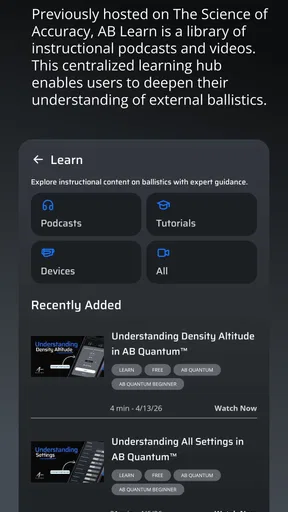
The app provides detailed user guides and tutorials within the app to help users navigate its features. Additionally, there is customer support available via email or through their official website. Users can also join community forums for peer-to-peer support and tips.
Are there any in-app purchases or subscriptions required?
Applied Ballistics Quantum offers a one-time purchase for full access to its features. Some updates or additional features may come as optional in-app purchases. It's important to review the purchase details on the app store to understand any potential costs involved.


